
Create your very own website wireframe.
In the last task, you had to come up with a list of 10 questions for a briefing form. I would like you to now fill in this briefing form, take the answers and create a wireframe for the site.
- Who are this company? Info on company history, brand, size, location etc. – I am a Graphic Design student. Small «company», new in the field.
- What is the goal of the website? – To show my work and progress in a informative and easy way.
- What do your staff and users want from the website? – To navigate easy and user friendly.
- Are you building something new or redesigning something that exist? – New.
- What are the expectations for this project? – To have a long lasting website.
- Who are your competitors and how do you differ from them? – I don’t see it as I have competitors, since I am a student.
- Do you have any colour preferences? What should the look and feel for the website be? – I like neutral colors and I want the look and feel to be creative and soothing.
- What actions do you want visitors to take on the site? – To see my work and to get to know me.
- What is your deadline for completing the site? How big is the budget? – Not a deadline, 0,- in budget.
- Who will be the contact person for this project? – I am.
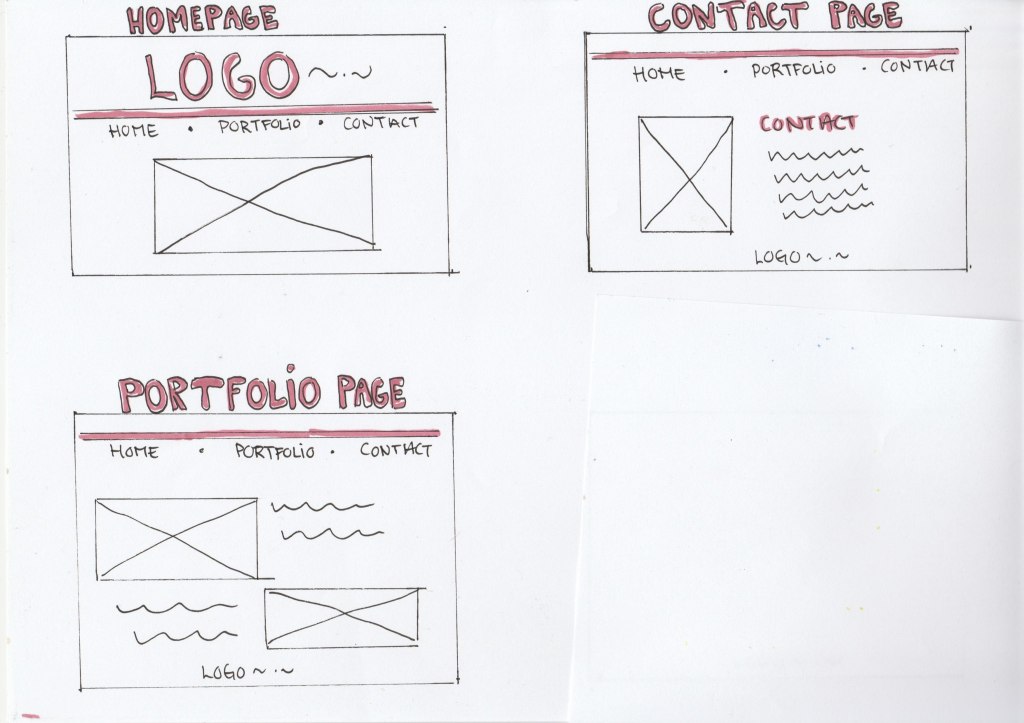
I chose to make the wireframe in a lo-tech architecture, since this is a «small company» and not a complex website. Also since this is my first time making a wireframe, I need to make a lot of editing which is easier with pen and paper. There will also not be a lot of elements.
My Wireframe:

 cathrinenilsen.com